
Errors are Everywhere if one looks close enough.
We can all agree that errors are somehow omnipresent if we look closely enough, but are they visible to be caught by naked eyes every time ?
Errors can occur for any number of reasons, such as incorrect server responses, faulty inputs from the user, runtime errors (even when the program compiles without error), database access failure, and even god forbid what not.
Is it possible to be ready to handle all errors at all times? If we lived in an ideal world, we would be, but we aren’t!!! In addition, what if we intentionally want to raise an error?
Our sweet spot lies in how we handle our errors (both system errors and errors raised by our applications).
Handling errors is an approach that allows you to construct your implementation so that, it can handle any interruptions (errors) during the execution of your code.
If any interruption occurs and it halts your program execution then we may have to say that our program died straight away . Yes it died – i;e your program won’t be able to execute and application may return to console, or it may just shut down altogether. Surely no one would ever want to see their program die . Lets see how can we avoid this . !!!
Progress Way’s of Dealing with Errors –
OpenEdge allows us to handle Errors in two ways i,e either using a traditional way of handling the errors at Statement levels along with Error handles or using built in system Classes to create/instantiate the error object to take care of raised error . We would dissect both approaches –
Our Favorite NO-ERROR
Ever Wonder why NO-Error is so important ? Because Progress takes care of Statement Level Errors using No-Error. Lets see what No-error actually does to help us –
- Suppression – User’s would not see the default error message that Progress may throw up due to suppression of the error message by Progress when the statement is supported by no-error .
Lets run a single line FIND statement (without no-error ).to understand above concept .
FIND FIRST Customer WHERE CustNum = 1000 .
MESSAGE “Error Raised – Execution Continued !!!” VIEW-AS ALERT-BOX .
Output –
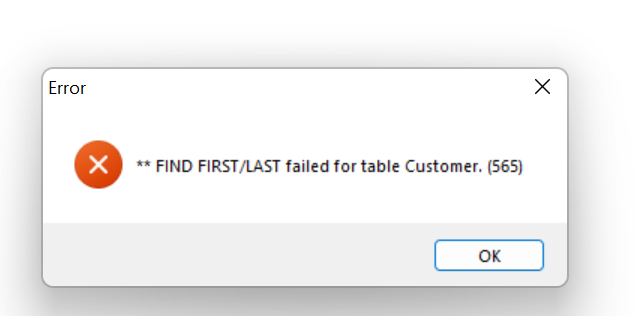
We did not get our Message as an output , because program halted at the find statement and did not execute further .
Now lets USE NO-ERROR –
FIND FIRST Customer WHERE CustNum = 1000 NO-ERROR .
MESSAGE “Error Raised – Execution Continued !!!” VIEW-AS ALERT-BOX .
OUTPUT –
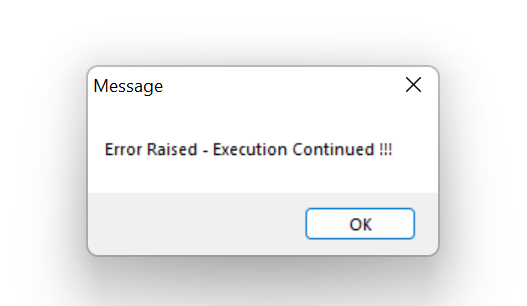
What actually happened?
- No-ERROR actually has suppressed system error (record is not available in database – 565 err)
- Your program survived (execution did not halt)
- We got our Message displayed on console (as program did not halt , message statement displayed).
2– Override the default error handling
What has just happened above in first example ? Did you observe ? NO-ERROR lets you also override the default 565 Error with your own custom error . It did so by making sure that next statement should get executed which is your custom error message.
Tip: Scope of NO-ERROR remains to the statement which uses it . Meaning- It suppresses the raised error only for the statement that uses NO-ERROR .
How does Progress behave by default when an error is raised ?
Go back to above example of NO-ERROR (where we have not used the NO-error), what do you think have happened when Progress AVM raised the error above ? Just displayed it to user and all done ???
If you look close enough – Progress not only have displayed the error on the terminal but also have left the procedure . In other words , it has effectively used the (ON ERROR ) LEAVE to exit the procedure file to go back to console or Editor.
Similarly Progress behaves in a certain way (by default ) when an AVM raises the error for other instances . Above is just one of such many behavior instances. –
Default behavior of Progress AVM for few of the blocks are –
| BLOCKS | DEFAULT BEHAVIOUR |
| .p file | ON ERROR UNDO, LEAVE |
| internal procedure | ON ERROR UNDO, LEAVE |
| FOR EACH BLOCK with an assign | ON ERROR UNDO, NEXT |
Above default behavior can be altered using your own set of instructions .
Can we have Errors raised as Class Objects ?
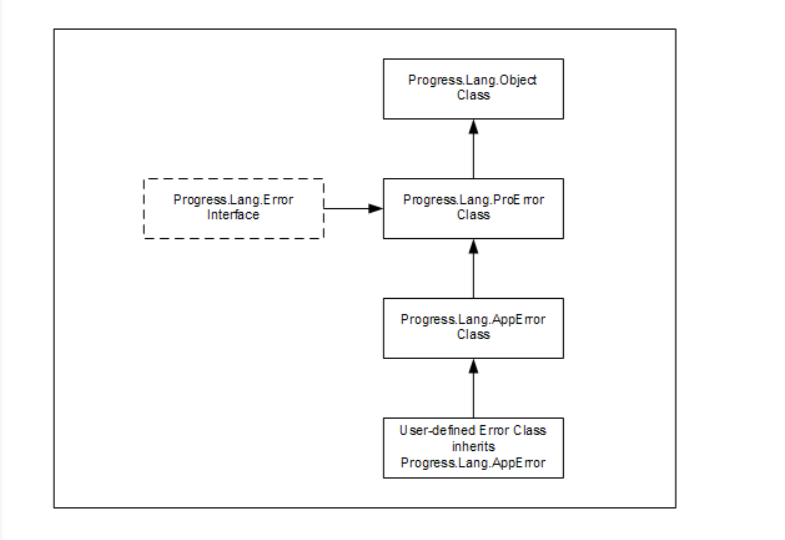
Yes Progress let errors be treated as class objects using ABL Error Classes .
Below is the hierarchy of ABL Error Classes from Progress Docs (Please do not memorize )-
How can we use above Classes ?
Progress.Lang.Error Interface –
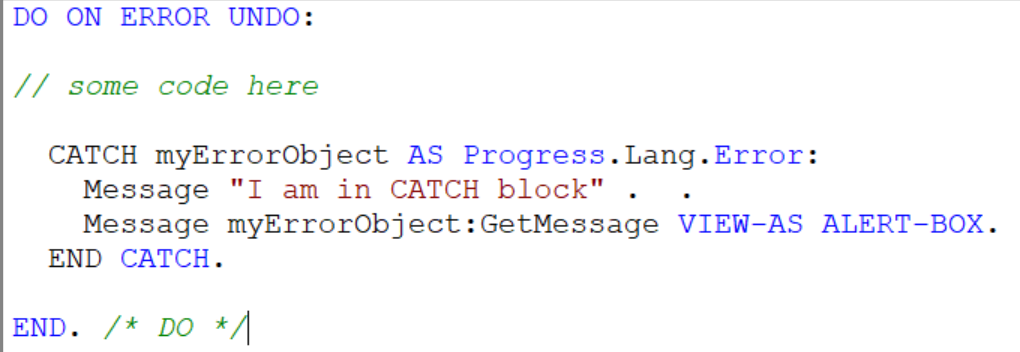
- You can create an object for any error type and then customize the behavior of your error object using interface methods. Error objects are instantiations of our interface class. See below –
A simple DO block , we are creating and instantiating a new interface object named myErrorObject.
As a result, our error object can take advantage of using the methods of our interface class to customize its behavior.
2- Progress.Lang.SysError – This is an important ABL Class that would allow us to raise error objects for System Errors that may occur during runtime and potentially can cause system to halt . Example-
Suppose you tried calling an internal procedure but forget to pass the parameter during procedure invocation. What would happen ? Think .
Lets see below simple code – Calling an internal procedure testDO but missed passing the input param.
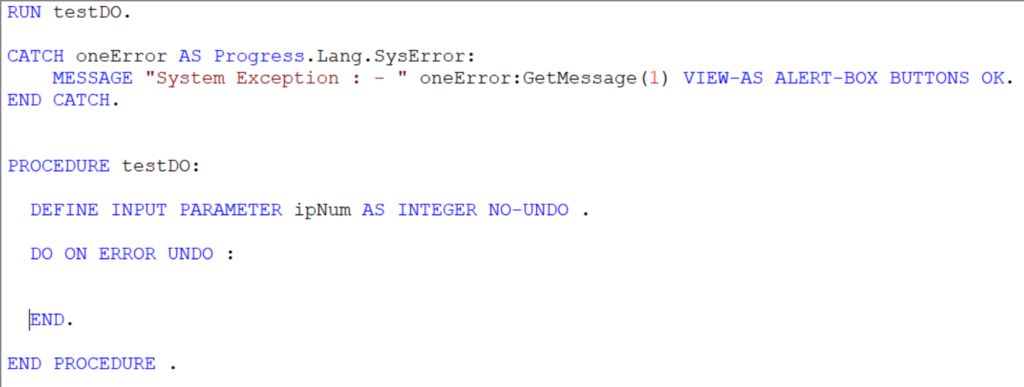
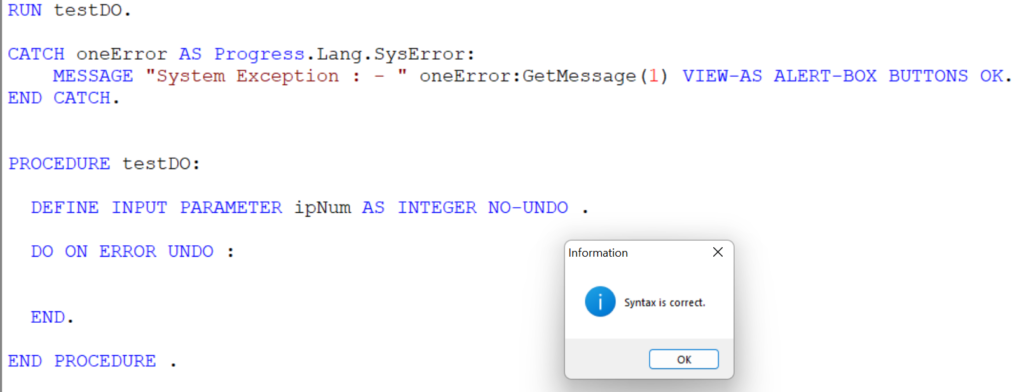
Do you think above problem could have been addressed during compilation ?? . Unfortunately , its not . See below – Syntax is correct .
Now lets run the Code .
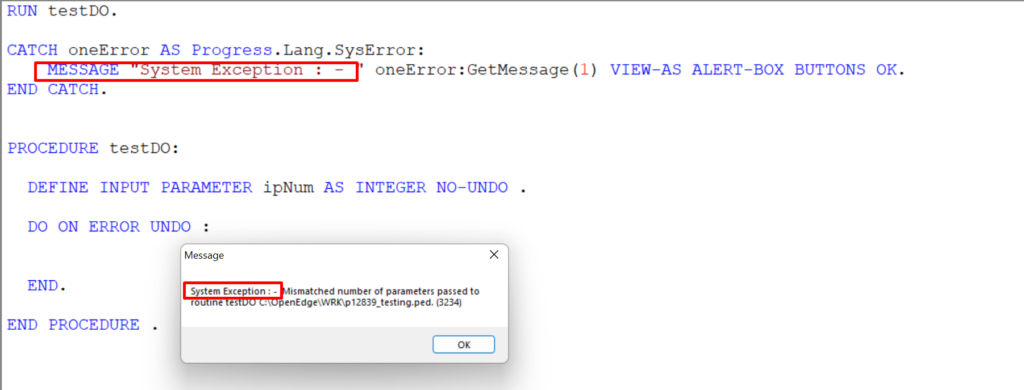
Three things happened –
- Run time error is safely handled by our error object oneError of class Progress.Lang.SysError.
- Using Methods of Class – GetMessage method allowed us to get the content of error message (also we customized the error message string to get more clarity of error being a system exception) .
- Safely catching of System Exception made sure that our program did not halt .
We can always use separate log directory to log the error object messages for troubleshooting purpose in later stages.
3- Progress.Lang.AppError –
Web Application smooth execution focus primarily on two aspects –
- It should respect business logic constraints .
- It should follow data integrity or consistency .
Above factors need us to validate data flow across various points of program execution thus making sure raising Application errors at such points are important . Raising Application errors which are customized can be treated as error object using Progress.Lang.AppError .
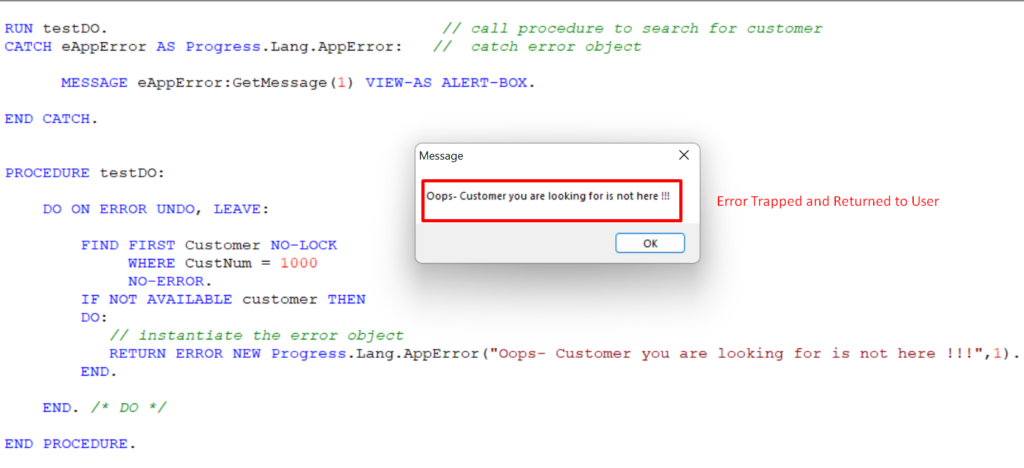
A Simple Example –
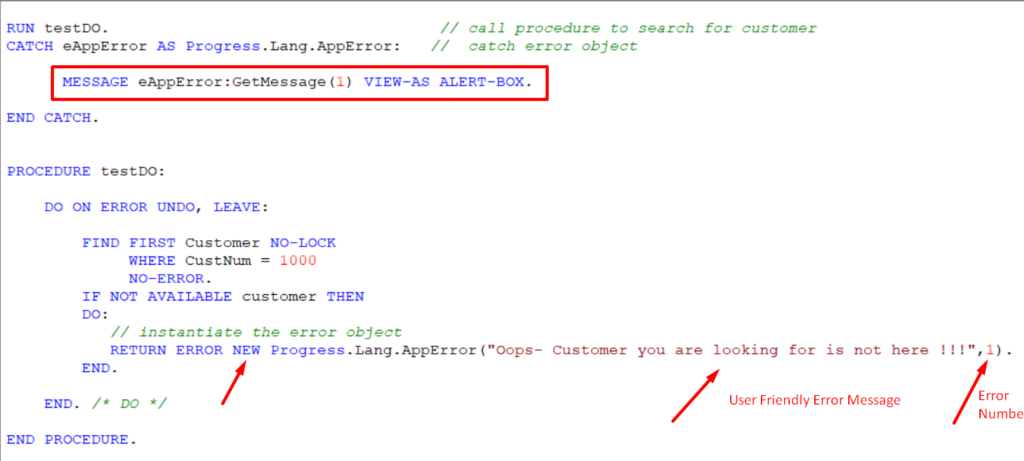
In above example – We are instantiating a new error object of AppError class for our Application logic in which customer is not available for CustNum 1000 , and eventually trapping the error .
Result –
What are CATCH blocks ?
Progress is traditionally a block oriented programming language in which even a single line of code is a block of procedure .
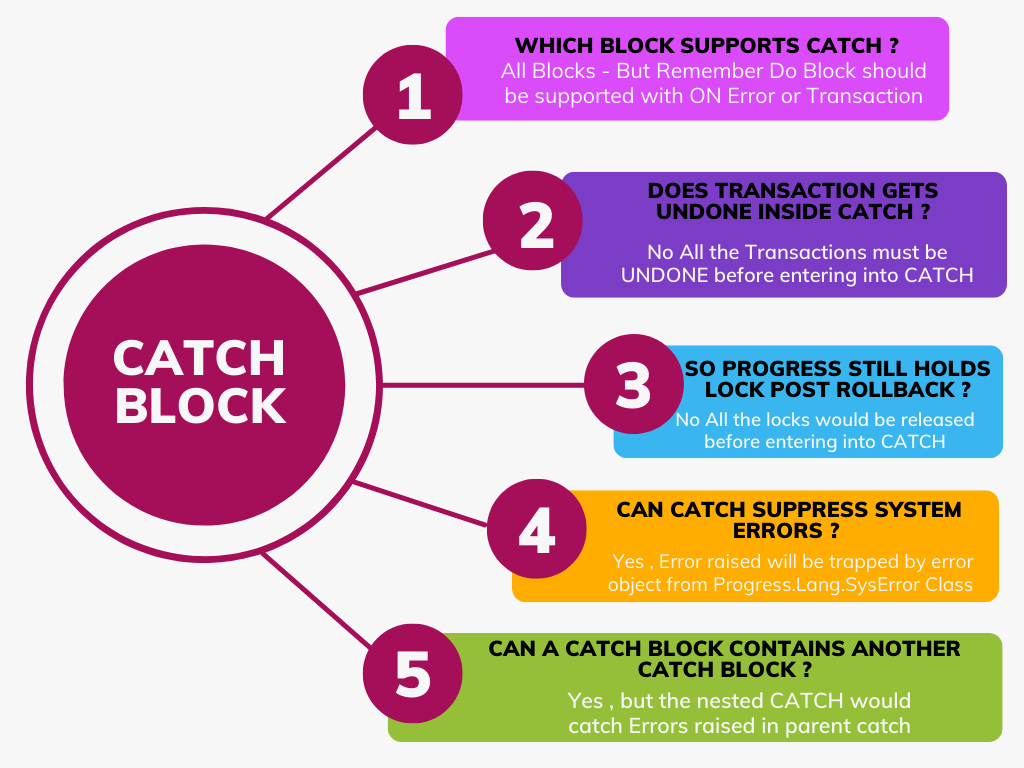
A catch block is used to trap raised errors and handle them appropriately.
So CATCH is an ERROR handling BLOCK .
Syntax of CATCH –

- myErrorObject is Error Object of Class – Progress.Lang.Error
- Your Code in between
- END CATCH – to end the block.
Is it always the best way to handle Errors Locally?
What do you think of above ?
Handling Errors Locally is Beneficial – Because you want the amount of work to be undone to be minimal when error is raised . But is it always the best approach ?
Answer lies in how you think you can handle similar type of errors across your application . It is better that we trap the same type of errors by a same catch rather than having individual CATCH locally to handle them all at different locations .
It gives rise to the need of making sure that errors should be raised from multiple locations to reach your single CATCH at a central location .
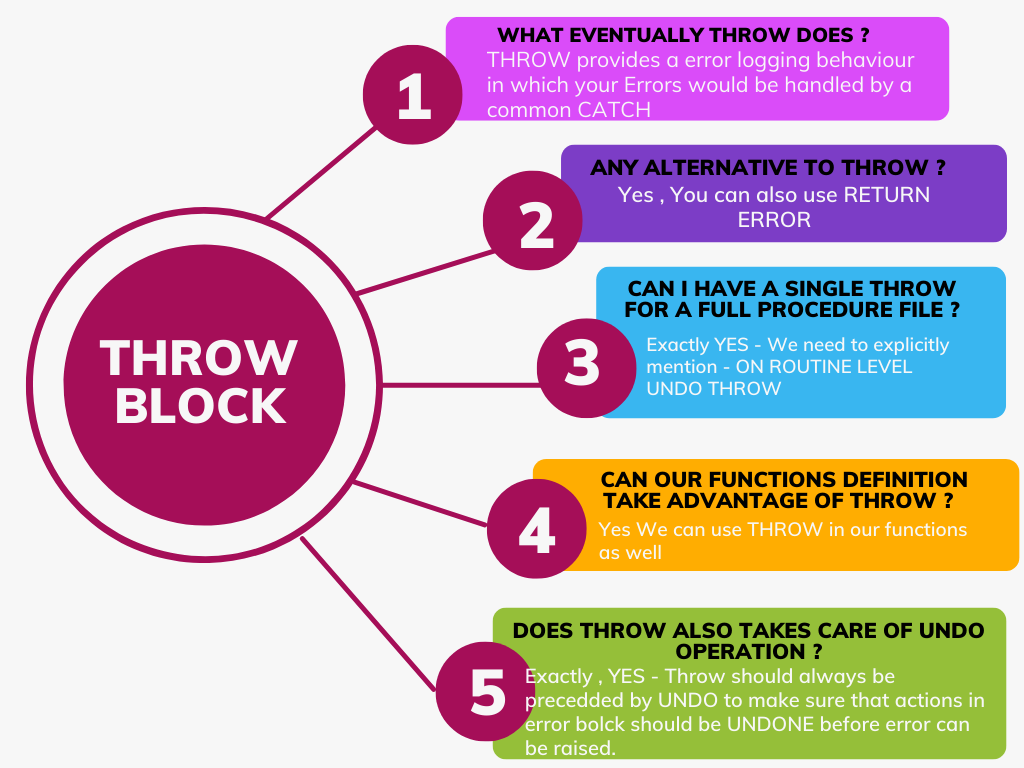
.Throwing raised errors to a certain location requires moving errors to a certain call stack where they all can be handled by common CATCH. How do we do that ? Use of THROW help us achieve the same .
Use of THROW would raise the error from testDO procedure to be caught by the catch of the main file (See below code bit) .
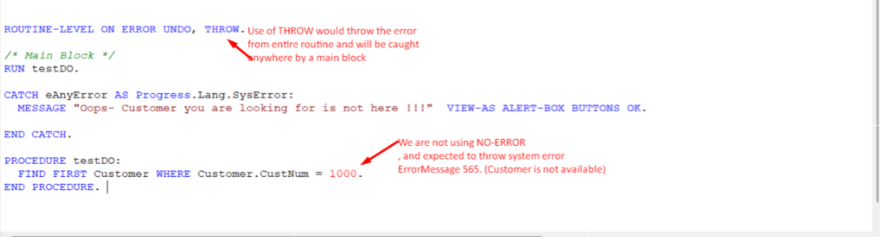
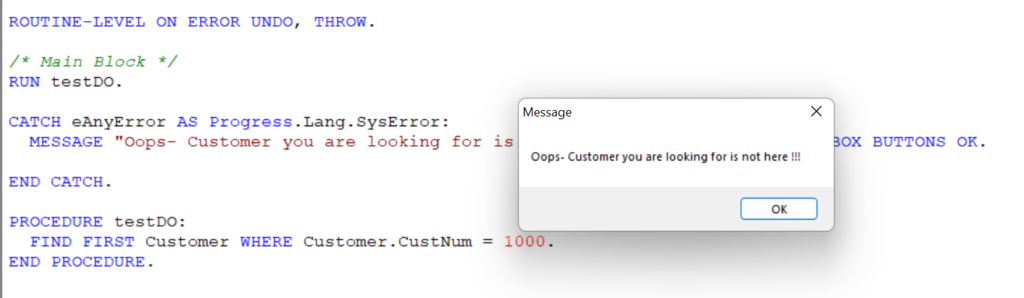
As we ran the above program , system error us throws and caught by main procedure below . CATCH further allowed developers to customize the raised error in a more user friendly understandable text (See below) .
Quick Bit on THROW .
@Copyright – BlogEdge.
Conclusion
Handling errors is an inevitable reality of any programming, But it is our responsibility to handle them gracefully and learn from our mistakes . Afterall much of the Success is not repeating the same mistakes , isn’t it ?
Hopefully you have gained a better understanding of Error Handling in OpenEdge .
You are welcome to share this with others in your community, and also feel free to add your valuable comments here.




TEsting the Comment